Nomad.nvim
Nomad Cluster Explorer for Neovim
A beautiful sidebar interface to explore and manage your HashiCorp Nomad cluster directly from your editor. Monitor jobs, nodes, and cluster topology with ease.
Nomad Cluster Explorer for Neovim
A beautiful sidebar interface to explore and manage your HashiCorp Nomad cluster directly from your editor. Monitor jobs, nodes, and cluster topology with ease.
Browse jobs and nodes with real-time status updates in a beautiful sidebar interface
Fuzzy search jobs and nodes with advanced filtering using telescope.nvim
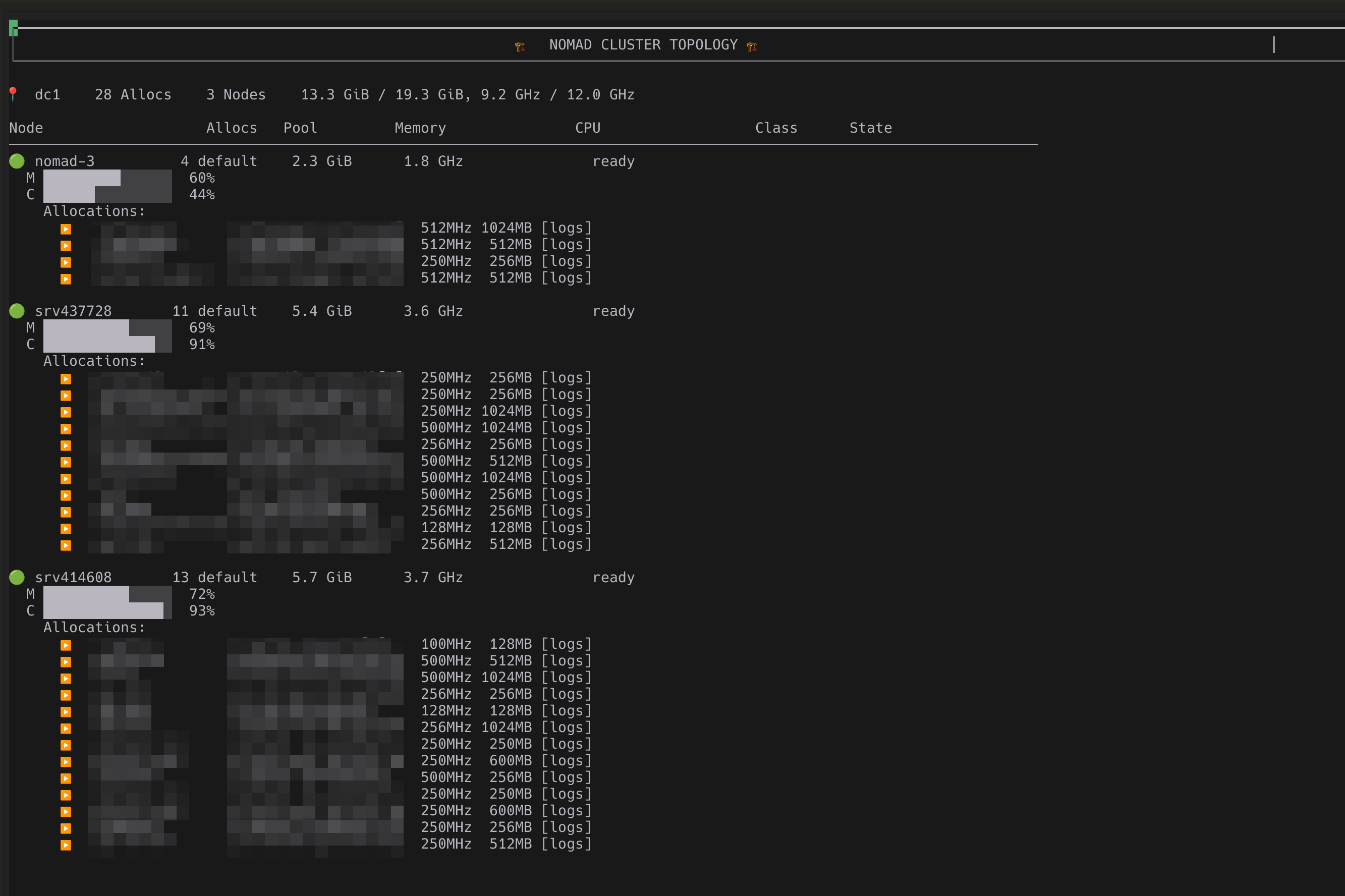
Interactive full-buffer view showing resource usage and allocations per node
Interactive logs display with refresh and follow capabilities
Start, stop, restart jobs directly from Neovim with simple commands
Drain and enable nodes with a single command for cluster maintenance
Sidebar, floating window, or split pane - choose your preferred layout
Non-blocking API calls with intelligent caching and rate limiting
Works seamlessly with Nomad clusters that have ACLs enabled
Support for multi-datacenter Nomad clusters with region switching
View CPU, memory, and disk usage per node in real-time
Intelligent caching system to reduce API load and improve performance
{
  "lukaszmoskwa/nomad.nvim",
  dependencies = {
    "MunifTanjim/nui.nvim",
    "nvim-telescope/telescope.nvim",
    "nvim-lua/plenary.nvim",
    "nvim-tree/nvim-web-devicons", -- optional
  },
  config = function()
    require("nomad").setup({
      -- your configuration here
    })
  end,
}use {
"lukaszmoskwa/nomad.nvim",
requires = {
"MunifTanjim/nui.nvim",
"nvim-telescope/telescope.nvim",
"nvim-lua/plenary.nvim",
"nvim-tree/nvim-web-devicons", -- optional
},
config = function()
require("nomad").setup()
end,
}:NomadToggle
Toggle the sidebar
:NomadRefresh
Refresh cluster data
:NomadSearchJobs
Open Telescope job search
:NomadTopology
Show cluster topology
require("nomad").setup({
  -- Sidebar configuration
  sidebar = {
    width = 45,
    position = "left", -- "left", "right", or "float"
    border = "rounded",
  },

  -- Nomad configuration
  nomad = {
    address = nil, -- Uses NOMAD_ADDR env var
    token = nil,   -- Uses NOMAD_TOKEN env var
    timeout = 30000,
    namespace = "default",
  },

  -- UI configuration
  ui = {
    show_icons = true,
    refresh_interval = 30, -- seconds
  },

  -- Keybindings
  keymaps = {
    toggle_sidebar = "<leader>no",
    refresh = "r",
    details = "<CR>",
    -- ... more keymaps
  },
})Complete configuration guide with all available options and examples
View Configuration